
Model Context Protocol (MCP) on Google Cloud Run using the GoLang SDK

Introduction
Towards the end of last year, we saw the release of the Gemini 3 series of models, Google’s most powerful series of AI models to date. Naturally, one would expect Google (and other AI labs such as Anthropic, etc.) to continue pushing this frontier forward throughout the coming year, giving developers access to more intelligent models to power their AI applications and agents. That being said, could it be that one of the biggest unlocks to continued AI-driven value across organisations for the year ahead is not just better, more powerful models, but better connected ones? This sentiment is also reflected in our AI predictions for 2026.
But what does “better connected” mean practically?
For any LLM model to move beyond being an isolated “conversationalist chatbot” requires the ability to interact with and take action in the real world. From an AI engineering perspective, this means calling tools (or “function calling”). Tools are the specific interfaces that allow a model to query a SQL database, retrieve live weather information and trigger workflows, etc.
Historically, providing LLMs with tools ran the risk of becoming a fragmented and difficult-to-scale process. Each time you wanted to connect an agent to a new system (i.e. a CRM or some internal/external set of APIs), you had to write custom “integration code” compatible with the particular underlying LLM model’s tool registration API. Another undesirable pattern was custom tool integration logic deployed together with the agent itself, thereby eliminating the natural re-use of implemented tools with other agents. The implication was a N x M integration problem, N being the number of models/agents and M the number of connectable tool systems.
The introduction of the Model Context Protocol (MCP) addressed these challenges and has fast become the standard for exposing toolsets and connecting them to agents via the “MCP server”. Because tools and their implementation logic are hosted on the MCP Server, agents only need to become MCP clients to invoke any tool (hence the “plug and play, USB-C” analogy often used to describe MCP).
While running MCP servers locally (via stdio transport) is fairly common and can work for personal desktop assistants, production-grade agents require these tools to be highly available and secure (i.e. proper identity and access management, role-based access controls, etc.). To make this work in the enterprise, we should be thinking about moving MCP servers away from localhost and into the cloud.
In this tutorial, we’ll therefore explore how to deploy a simple MCP server on Google Cloud Run using the official GoLang MCP SDK. We’ll also use this (remote) MCP server to deliver tool capabilities to an ADK agent, similar to the one we developed in a previous post. All of the supporting source code is available.
MCP Server Configuration
The first step is to define some capabilities (i.e. tools) on the MCP Server. To keep things simple, we define a single GetCurrentTime tool function which accepts a structured “city” parameter and returns the current time information for the specified city:
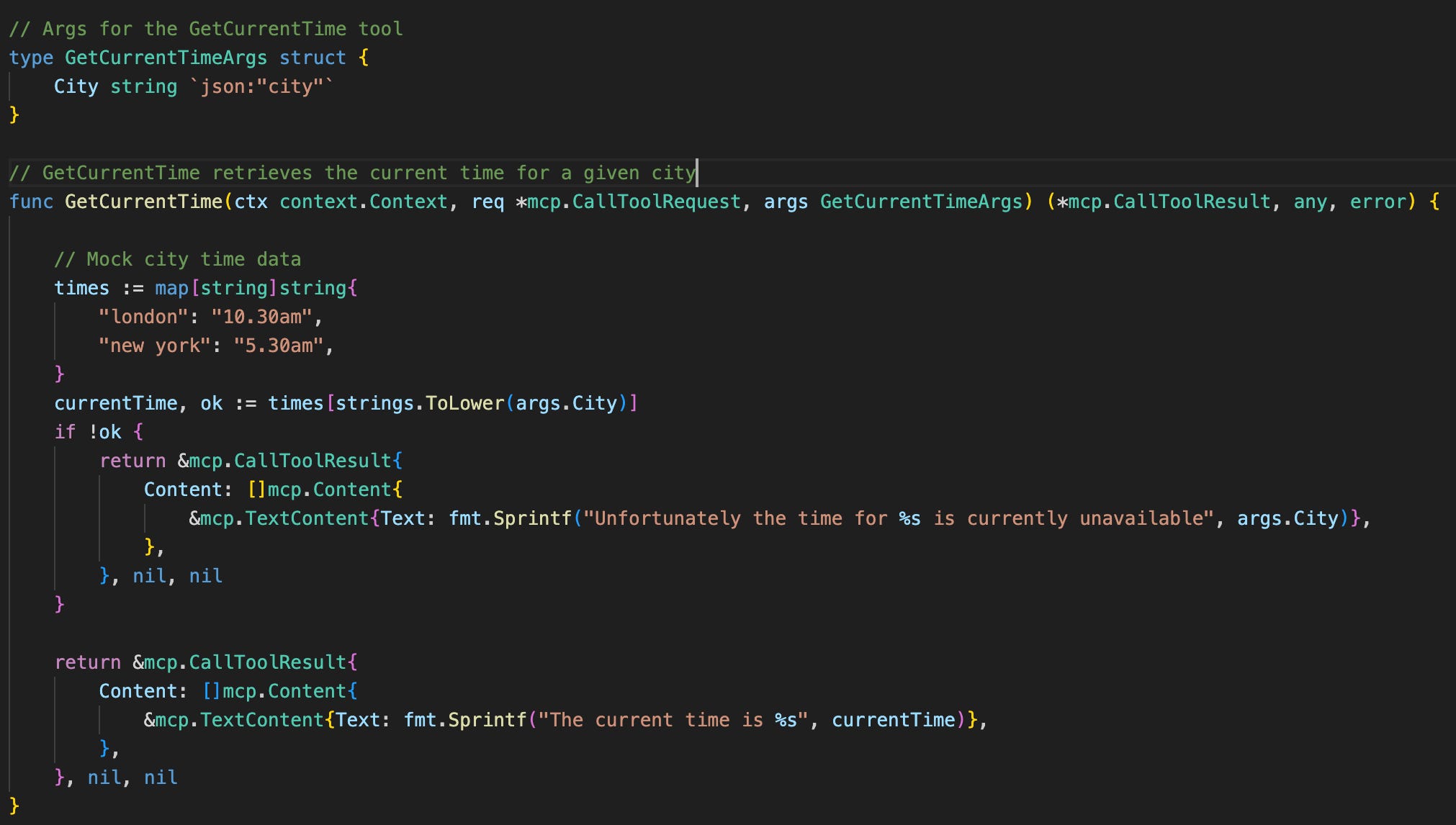
Note the use of mock data for purposes of illustration. This mock data would typically be replaced by calling an API (or set of APIs) to retrieve such information in real time.
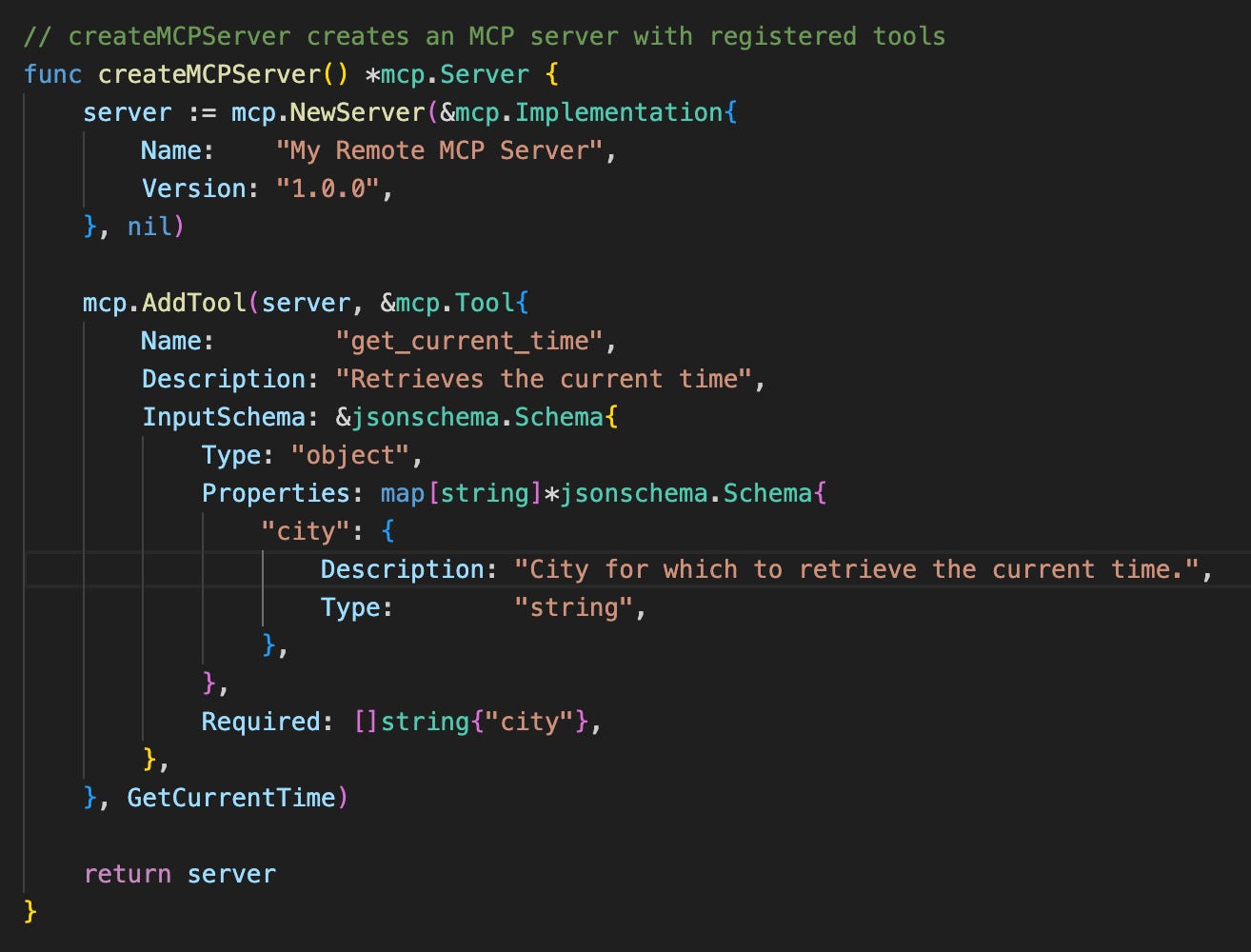
Next, we create the MCP Server object itself and formally register the tool on the server via the AddTool utility function. Importantly, the tool is given a name, description and input schema, all of which are necessary for any receiving agent to understand a) when and what it should be using this tool for, and b) how and with what parameters should it be invoked. It is therefore essential to provide clear and useful descriptions for the tool and input properties for any agent to be expected to use the tool effectively.
Bringing things together, the last step is exposing the MCP server object we created (with tool attached) to a transport to allow remote communication. For this purpose, we need to make use of MCP’s Streamable HTTP transport mechanism. The GoLang SDK supports this out of the box via the NewStreamableHTTPHandler, abstracting away all of the detailed and lower-level protocol handling.
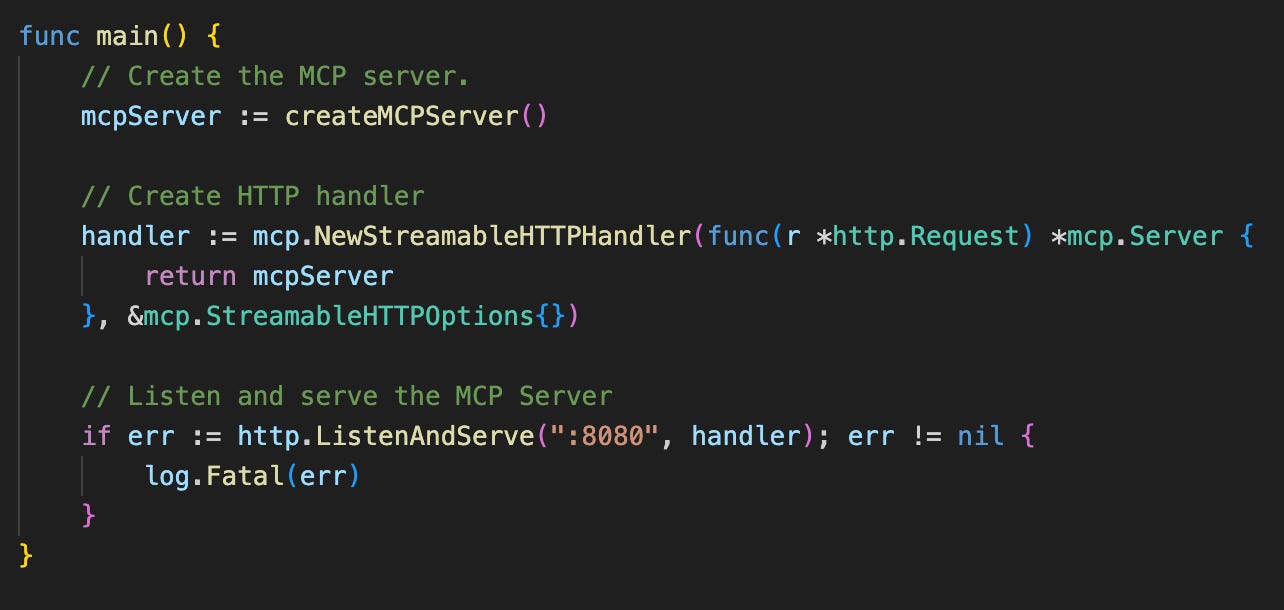
At this point we are ready to deploy to the MCP server to Cloud Run. See linked source code for deployment details.
Connecting to the MCP Server
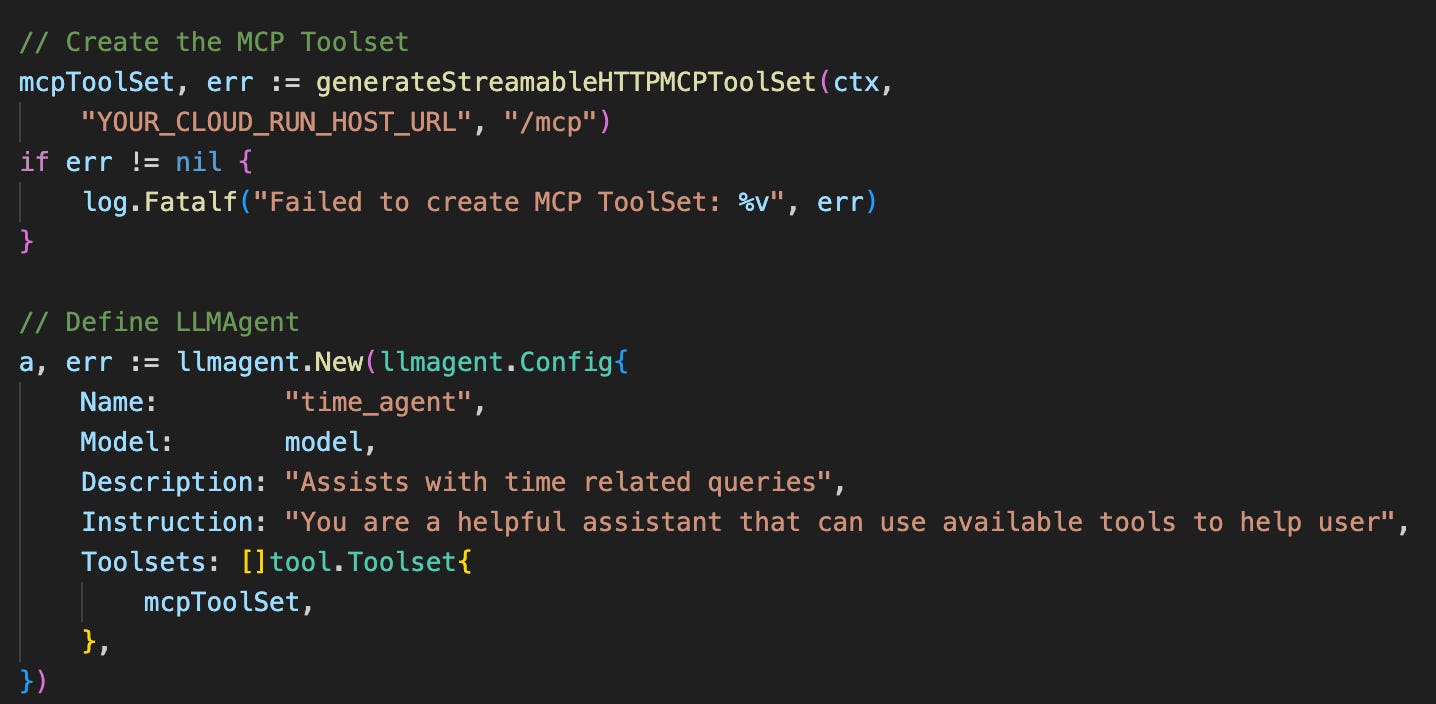
Once we have the MCP server deployed, we need to configure the ADK agent to connect with it. ADK provides the MCPToolset with StreamableHTTP transport configuration to help with this (i.e. providing the MCP Client connection). Note the replacement of the transport’s default HTTP client with the dedicated one created via idtoken.NewClient. This HTTP client automatically generates the correct ID token and add this as an “Authorization” header for each request to the MCP server. This is required to authenticate the agent to the Cloud Run service.
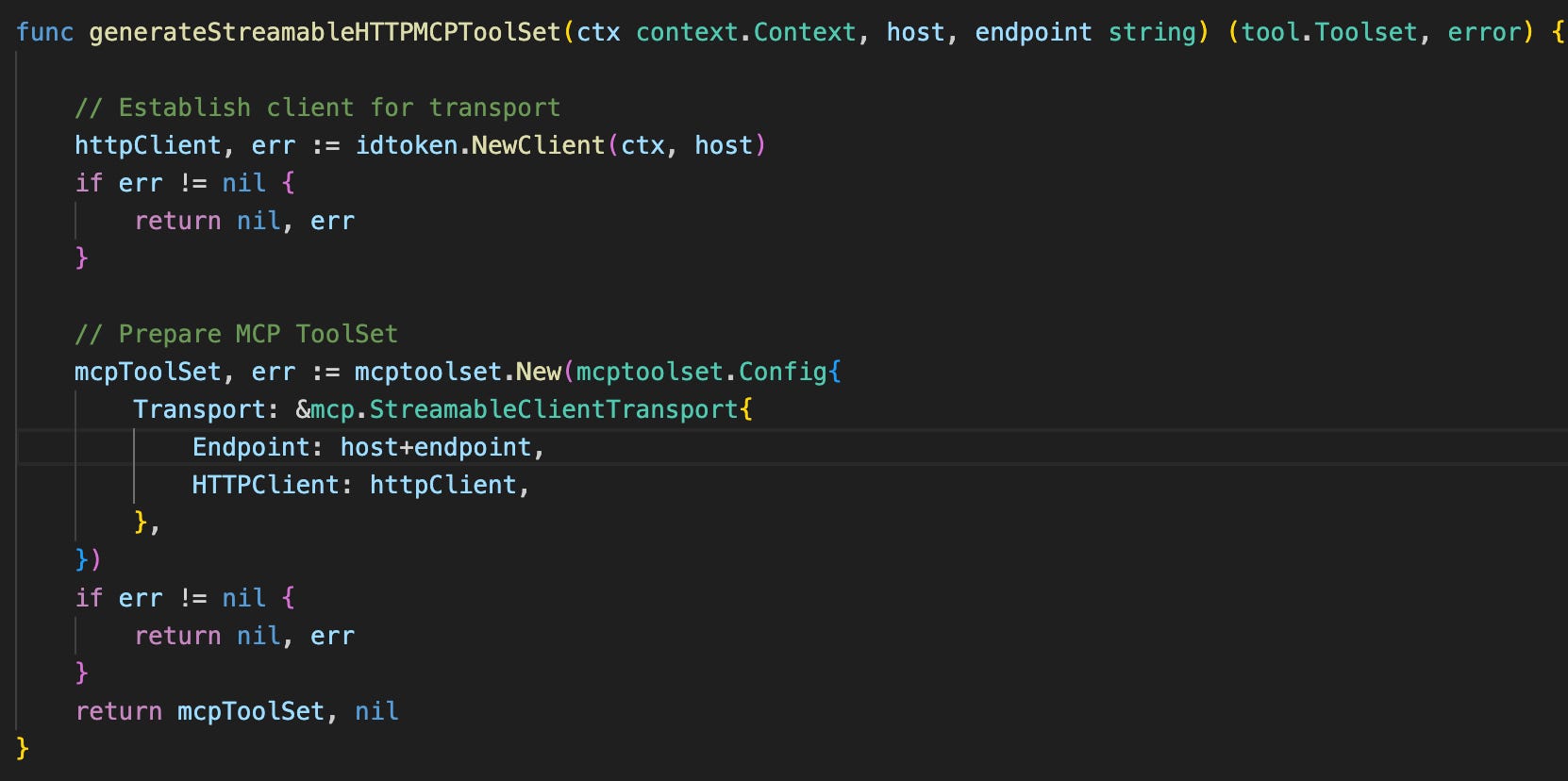
Registering the MCP Toolset on the agent itself is also made very simple via ADK. During session initialisation, ADK will perform a “ListTools” call to the MCP Server on the agent’s behalf and retrieve the tool capabilities, and then dynamically register these on the LLM. It is worth pointing out here that one can easily extend available agent tool capabilities by either updating the MCP Server with additional tools, or registering additional MCP Toolsets.
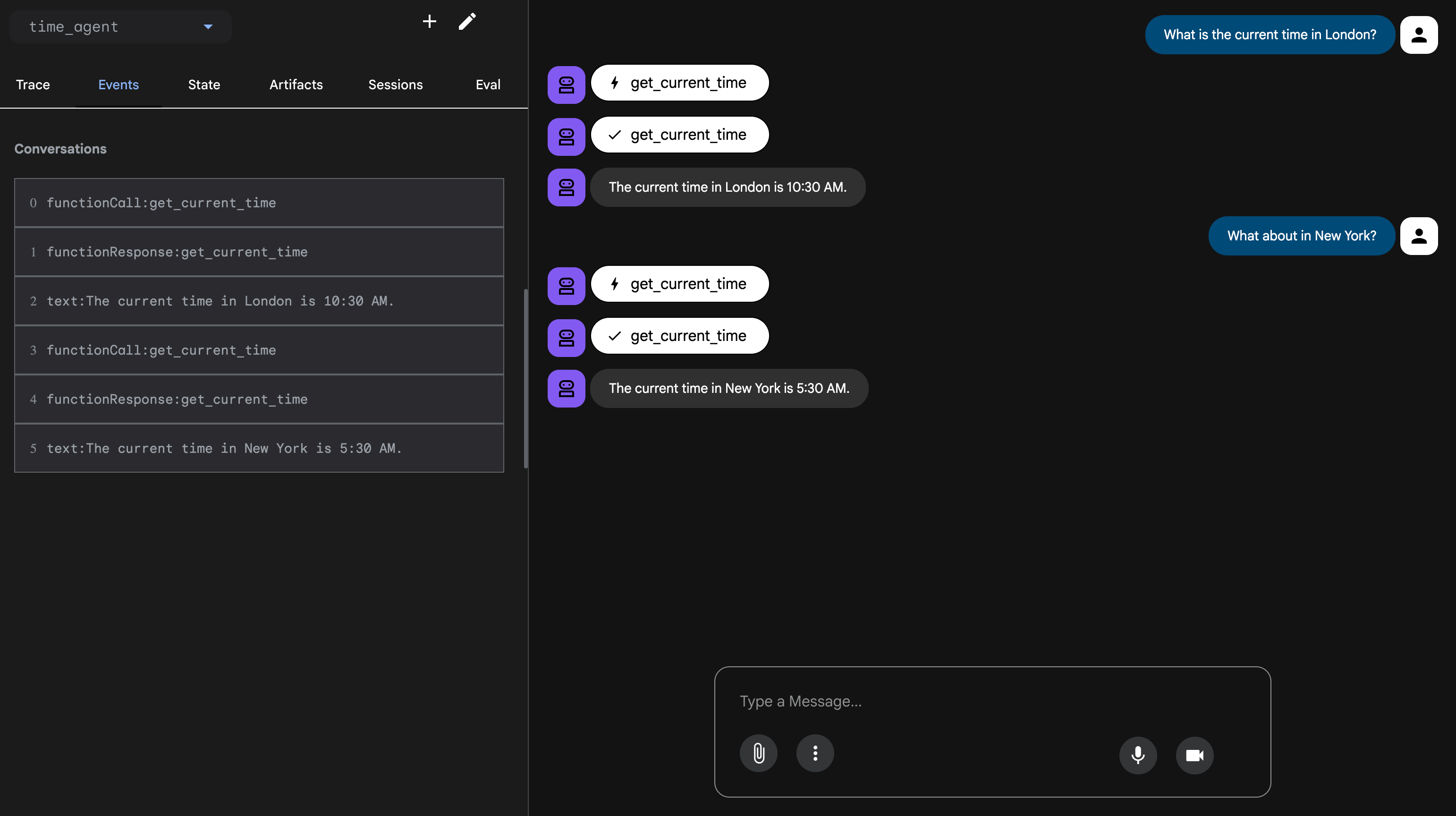
To see this in action, we launch the agent via the ADK WebUI. As expected, the “get_current_time” tool is invoked via the MCP Server when requested by the agent.
While a simple use-case, hopefully the above inspires some ideas around how to easily and better connect your agent with tools. Keep an eye out for more agentic AI patterns on Google Cloud in the coming weeks.