
Building multi-agent systems on Google Cloud using GoLang ADK, A2A and Cloud Run

Introduction
The industry is shifting in architectural philosophy from monolithic to collaborative, multi-agent systems. Much like the structure of modern organisations, these multi-agent systems mirror the collaboration between different business units and functional experts across varying domains.
However, architecting these systems can be challenging. Fortunately, Google offers a powerful stack for building AI agents. This begins with the Agent Development Kit (ADK), a powerful and flexible open framework for both prototyping and deploying multi-agent systems and workflows. The ADK also delivers native support for the Agent2Agent (A2A) protocol, the current standard for communication between agents. This make it super simple to allow your agent to plug into existing A2A ecosystems.
As I pointed out in a recent post, the GoLang ADK is a particularly powerful and performant choice for serverless, scale-to-zero agent systems (such as those hosted on Google Cloud Run). It is therefore a great candidate for developing performant multi-agent systems.
This tutorial demonstrates the simplest route to deploying an A2A-enabled, multi-agent system on Google Cloud Run using the GoLang ADK. Of course, as the need for greater control and customisability become important, we can give up certain layers of abstraction, which I’ll potentially cover in a separate tutorial. The full source code for everything covered below is also available.
The Multi-Agent System
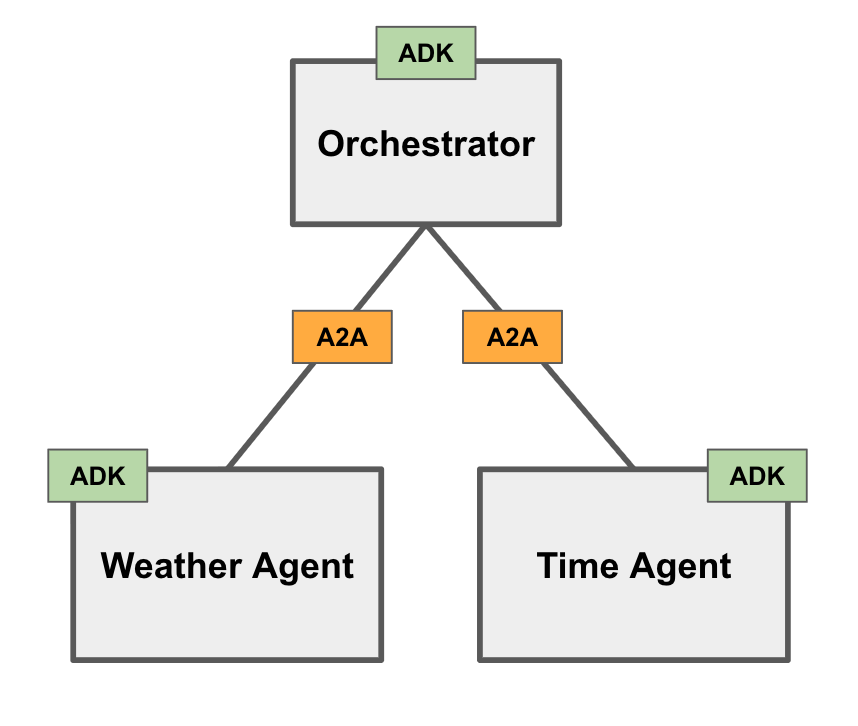
For some upfront orientation, the below diagram demonstrates the simple multi-agent system we will be developing. This will consist of an Orchestrator agent communicating with two remote (Weather and Time) agents via A2A. We’ll unpack these components one-by-one.
Weather Agent
To keep things purposefully simple, we define a basic weather agent having a single “get_weather” tool. This tool gives the agent the ability to retrieve weather information for a given city. Note the simplicity of this tool’s handler function, providing a static, hard-coded weather report. Typically, one would instead have the handler invoking some external API to retrieve dynamic real-time information, but these details remain out of scope for purposes of this tutorial.
As a “shortcut” to expose communication with our simple ADK Weather Agent agent via the A2A protocol, the ADK provides the built-in “A2A launcher”. This launcher takes care of two things:
Automatically generates an A2A AgentCard based on our agent configuration and serves this at the /.well-known/agent-card.json endpoint. The AgentCard advertises the agent’s skills and capabilities so that clients (and other agents) can understand how and when to use it.
Assigns and serves A2A requests at the /a2a/invoke endpoint (accepting JSON-RPC requests).
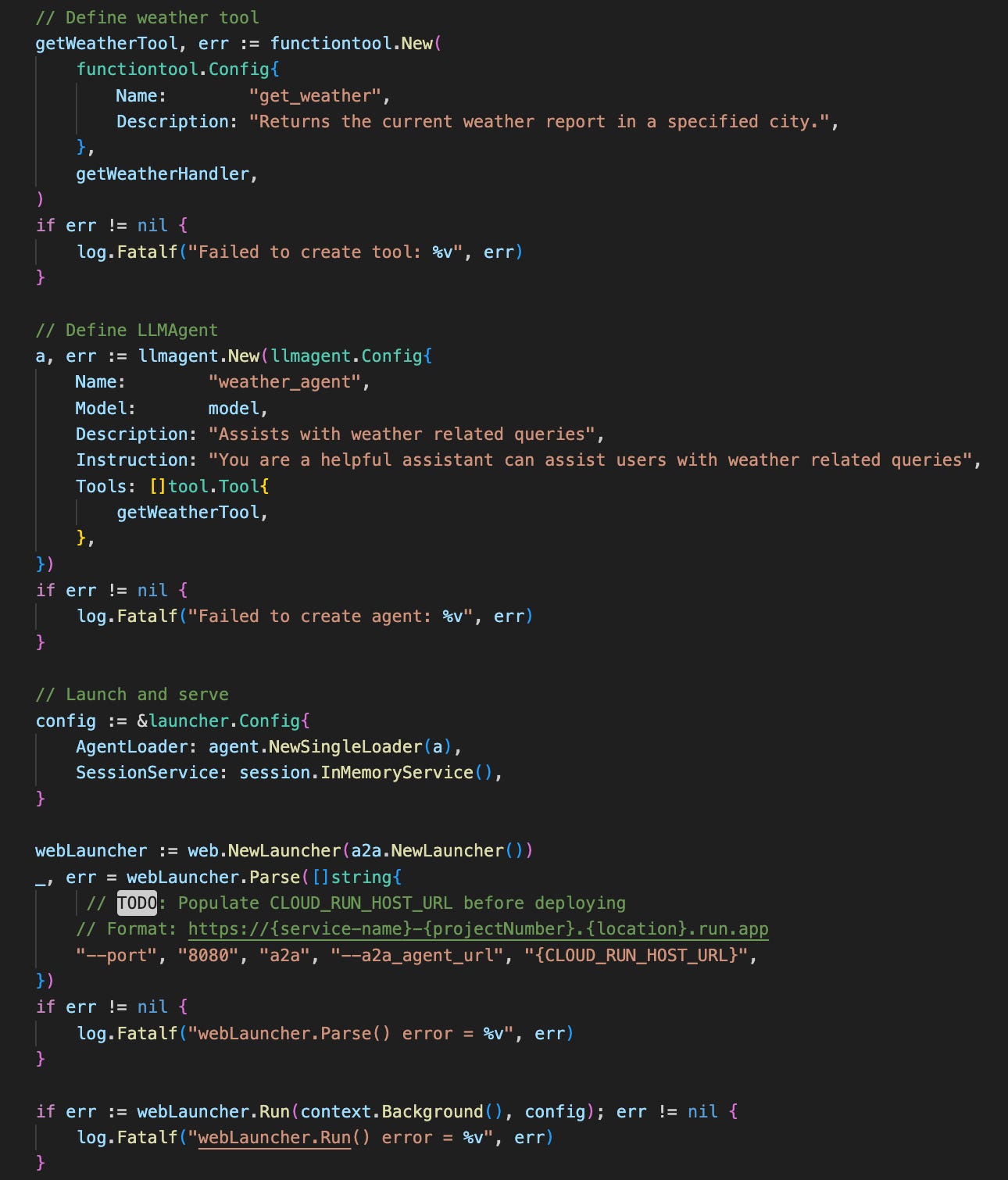
Pay attention to the “CLOUD_RUN_HOST_URL” placeholder. This indicates to the A2A launcher that the AgentCard should advertise the CloudRun service URL as the agent’s host when deployed. ADK will automatically append the /a2a/invoke endpoint to the end of the provided host URL which will be important for any client trying to reach the agent via it’s AgentCard details (as we will see later).
Time Agent
In order to establish a multi-agent system, we need at least one more remote agent. To keep things simple, we define a “Time Agent”. It is basically identical to our “Weather Agent”, except that it assist users with identifying the local time for a given city. Refer to the source code for details.
The Orchestrator
At the “head” of our multi-agent system is the Orchestrator agent. It acts as the manager and/or delegator and is responsible for understanding the user’s query and intent and delegating tasks to available specialist agents before synthesising the output into a final response.
The Orchestrator agent’s implementation is slightly more complex than our simple Weather and Time remote agents as it needs to take care of several processes:
Given a remote agent’s host URL, retrieve the agent’s AgentCard
Using the retrieved AgentCard details, register a new remote agent connection
Decide on the architectural relationship between the orchestrator and remote agents (i.e. agent-as-a-tool or subagent). We’ll focus on ‘agent-as-a-tool’ architecture in this tutorial, but I encourage you to read through this article for clarification of the differences and implications.
Let’s address the Orchestrator agent requirements one at a time.
1) Retrieve remote Agent Cards
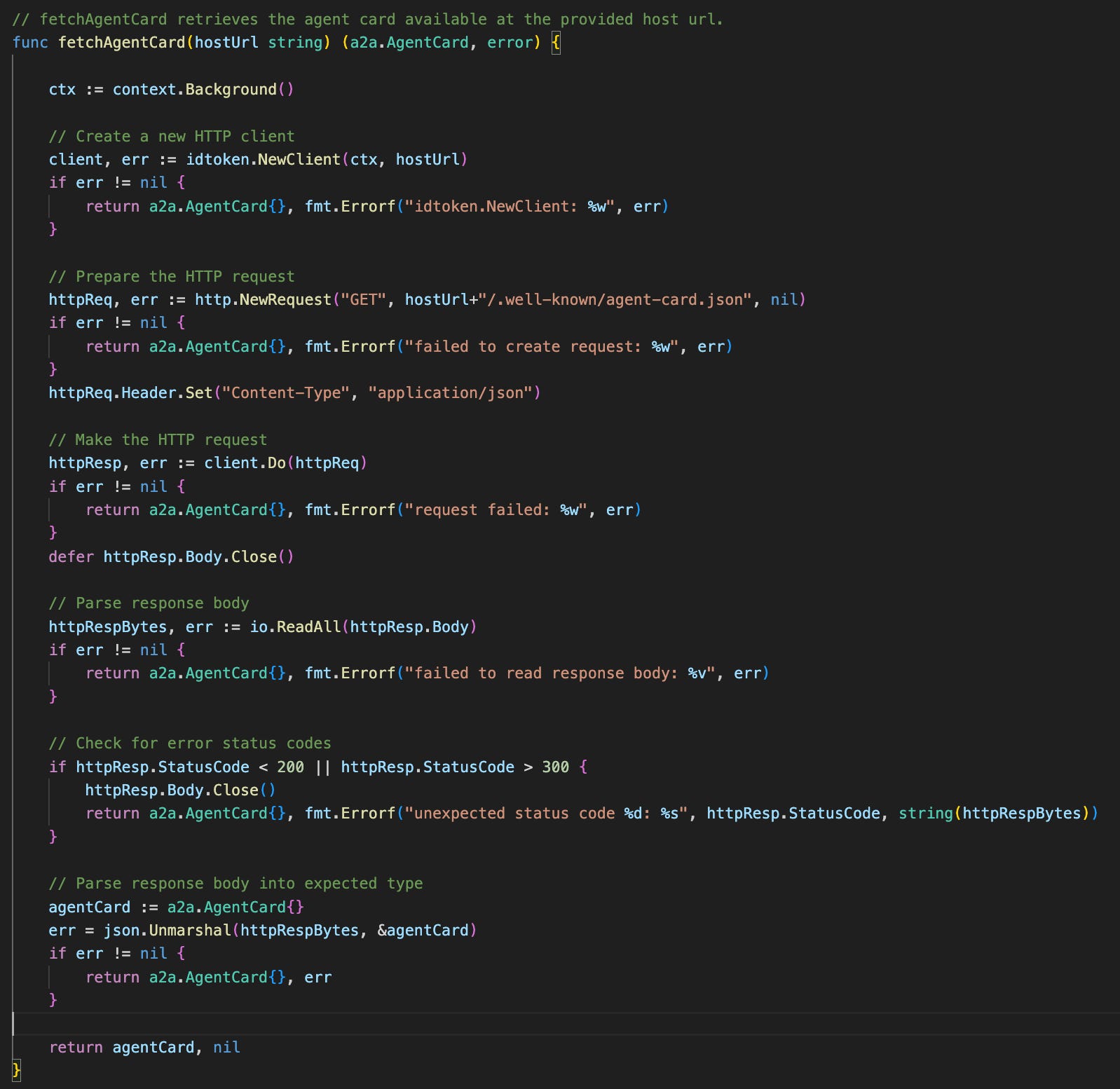
Since A2A agents (like our simple Weather and Time remote agents) expose their AgentCard via the standard ./well-known/agent-card.json endpoint, the Orchestrator agent only needs to know each remote agent’s host URL to locate the AgentCard. We define the fetchAgentCard() function to help the Orchestrator with this.
2) Establish authenticated remote agent interaction
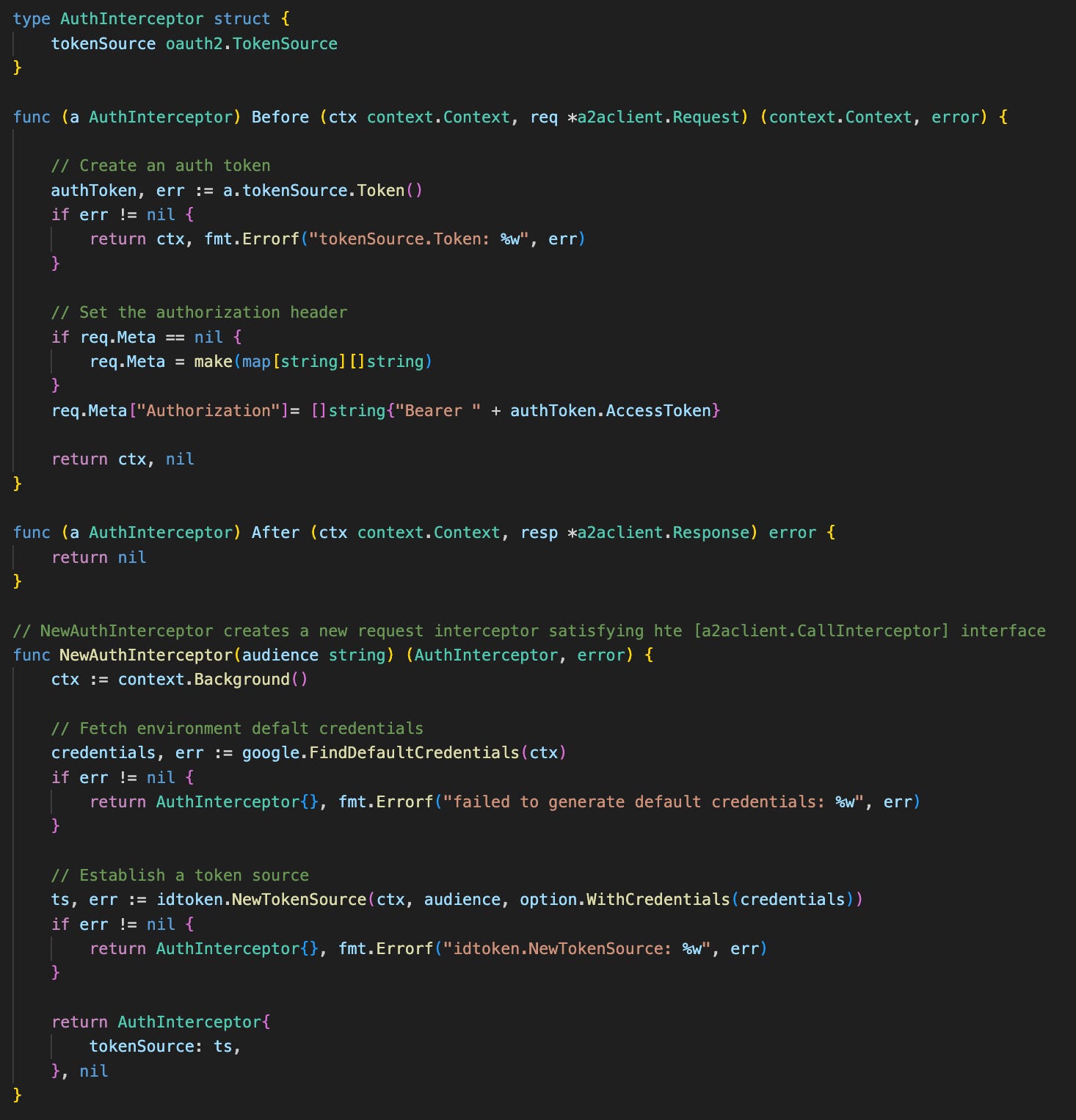
Next, we define another helper function, newRemoteAgent() which accepts the remote agent’s host URL. This function uses the fetchAgentCard() function we defined before to retrieve the agent card and configures a new remote agent using the retrieved card details.
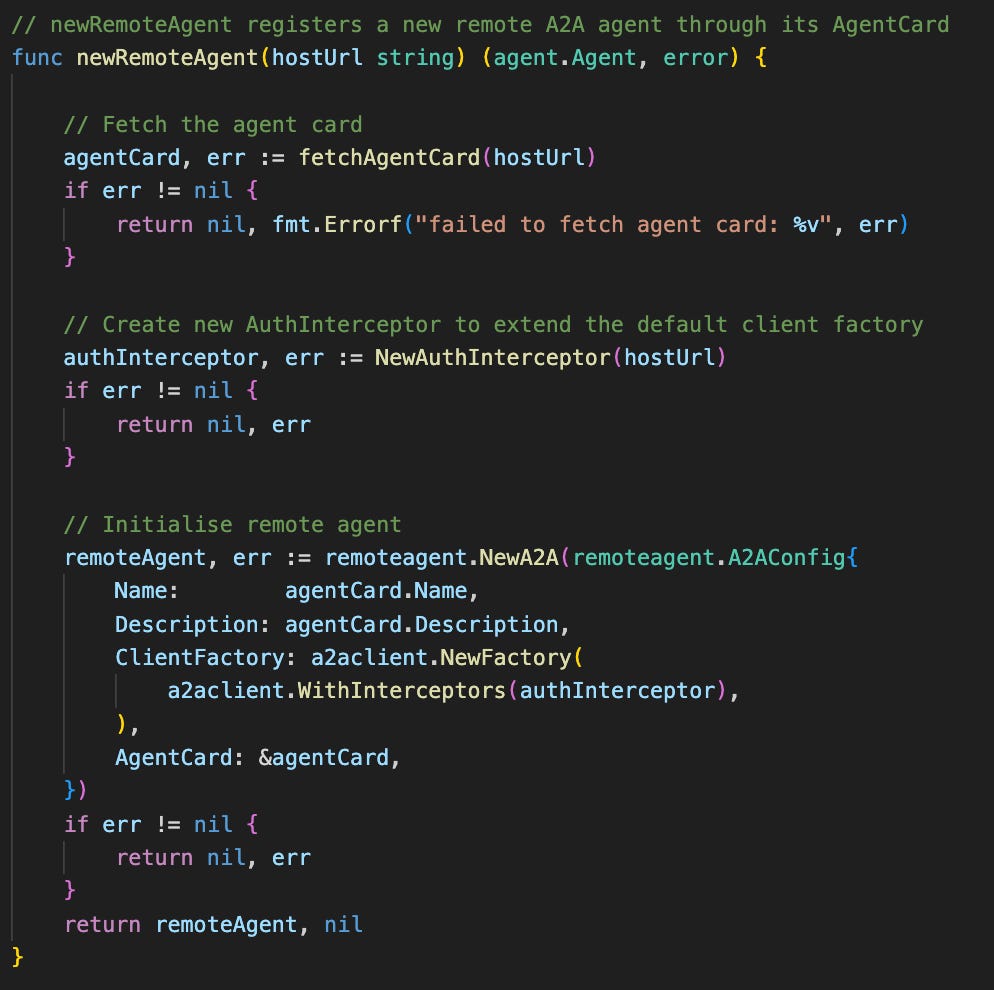
It is worth pointing out the custom AuthInterceptor defined and used to extend the default client factory configuration. This is necessary to allow the Orchestrator agent to send authenticated (service-to-service) requests to the separate Cloud Run services hosting the remote agents.
3) Connecting the multi-agent system
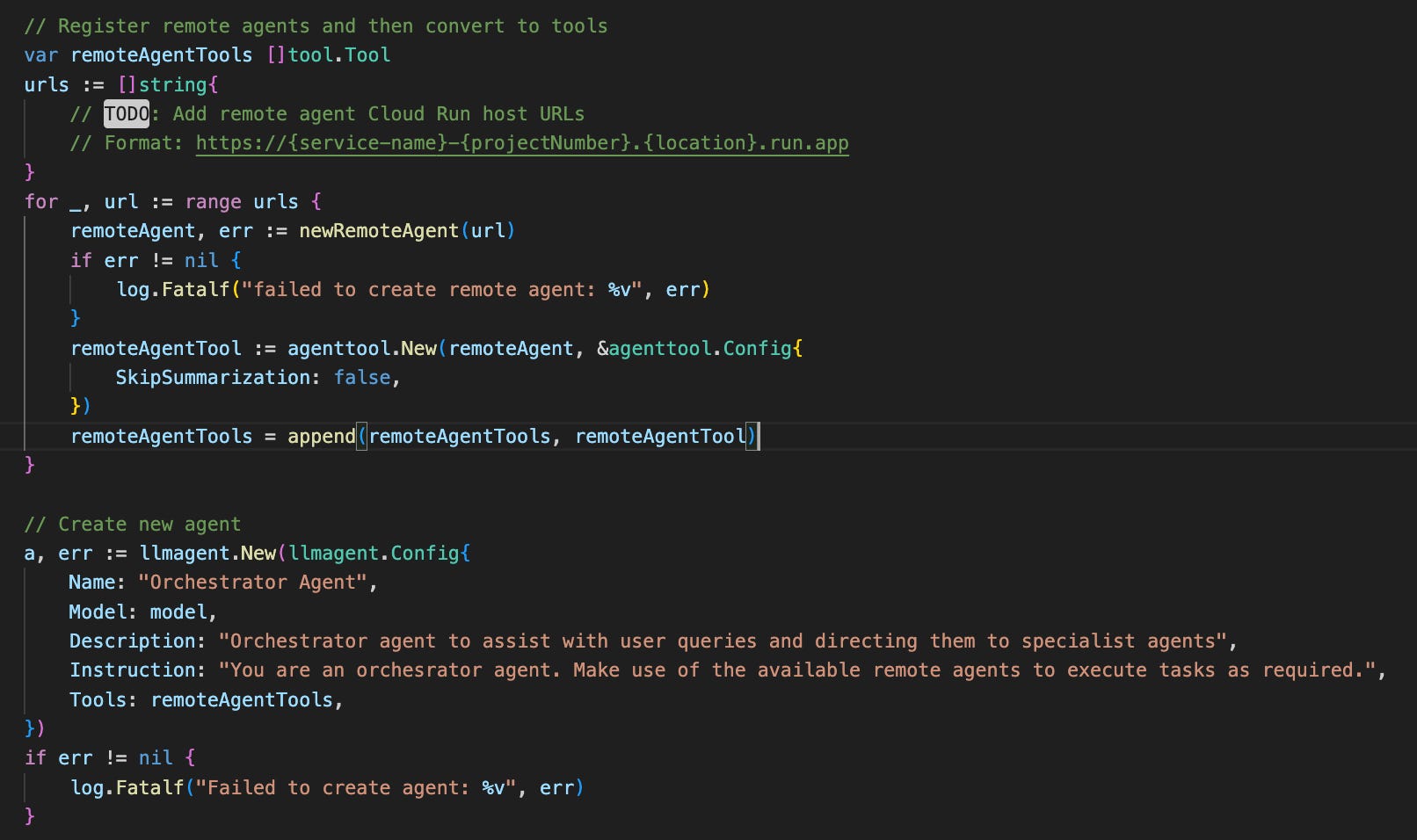
Finally, we have all the pieces we need to finalise the Orchestrator. As mentioned, we will be focusing on the ‘agent-as-a-tool’ architecture. This architecture can be constructed quite simply via the built-in ADK agenttool.New() wrapper method, which translates the agent into a standard tool and takes care of the A2A interactions under the hood.
To see this all in action, we launch the Orchestrator agent via the ADK WebUI launcher and send a request. The Orchestrator agent has invoked tool calls to both the Weather and Time agents in parallel to separately retrieve weather and time information referred to in the request, before finally synthesising both results into the final response.
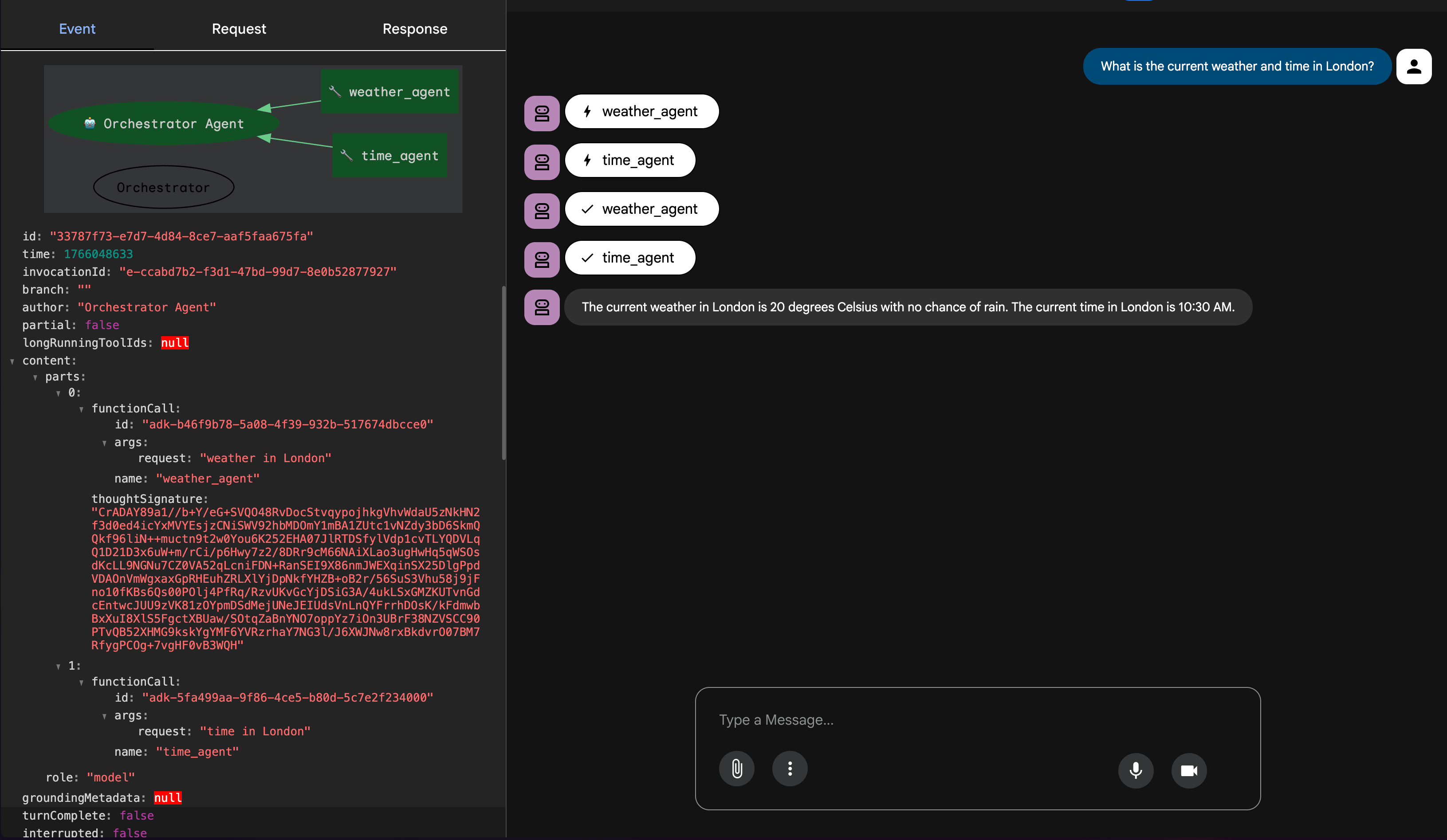
Despite being a very simple system, hopefully it is clear that the multi-agent pattern becomes highly extensible and quite powerful. Through simply deploying new agents and registering their A2A host URLs on the Orchestrator, new sets of capabilities and tasks become available.
Stay tuned for more of these patterns in the coming weeks.
Super useful to see what it practically looks like to string together a multi-agent system.