
The Agentic AI Digest (24 Oct) | Gemini's Built-in Tools, Gemini 2.5 UI Model & AI Studio Updates
This week: We look at Gemini’s built-in URL context tool, and highlight the new Gemini 2.5 Computer Use model and the latest prototyping features in Google AI Studio.


Hi everyone,
Welcome to your weekly briefing from the Agentic AI Roundtable. Our goal is to cut through the noise and deliver the most relevant signals, patterns, and community wins to help you build more effectively.
Let’s dive in.
From the Workbench: Patterns to Pocket
Introduction to tools: Gemini and the internet
Tools are what allow LLMs like Gemini to go beyond simple text generation. They let them interact with the world. This capability is a key part of what makes AI agents so powerful. While our ‘Watch Me Build’ series has covered how to create custom tools, Gemini also has extremely useful built-in tools you can enable directly in the configuration settings. Gemini’s most useful tools enable it to gather context beyond its knowledge cutoff:
Grounding responses with Google Search & Maps
URL Context enables gemini to gather context from a website when a url is specified in a prompt.
This week, we’ll focus on url context.
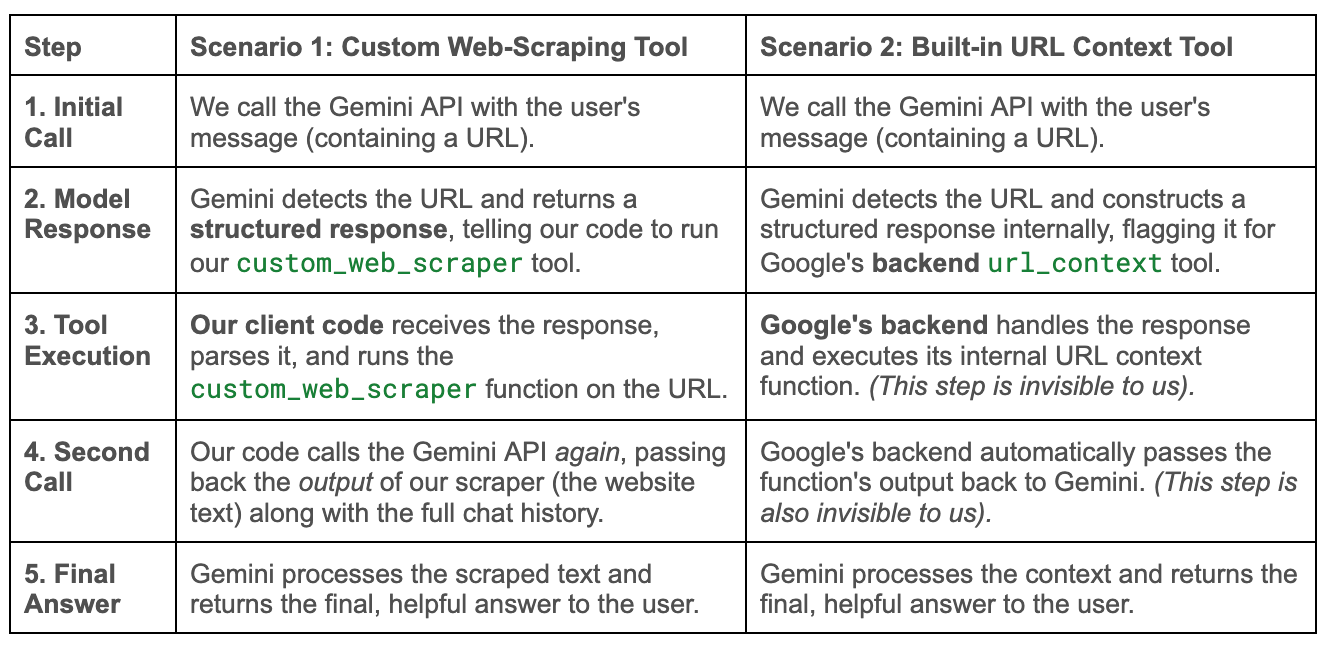
How Tool-Use Works: A Comparison
Let’s suppose we want a Gemini chat interface that can “read” and understand URLs in the messages we send to it. We have two main options: build it ourselves or use the built-in tool. Here’s a side-by-side look at the process for each:
Why Use Built-in Tooling?
As you can see from the table, the built-in tool (Scenario 2) saves significant development effort. The primary advantages are:
Less Code: It saves you from having to research, build, and maintain your own web-scraping tools.
Simpler Logic: It abstracts the execution of the tool. Your code just makes one API call and gets the final answer, rather than handling the intermediary request/response loop to run the tool yourself.
Better Performance: Google’s default tooling is often better than what we were able to build ourselves.
The URL context tool can parse text, PDFs, and even images from a link.
We’ve found that some websites block our custom scrapers, but Gemini’s tool can often bypass these blocks and successfully retrieve the content.
Using the url context tool in the code
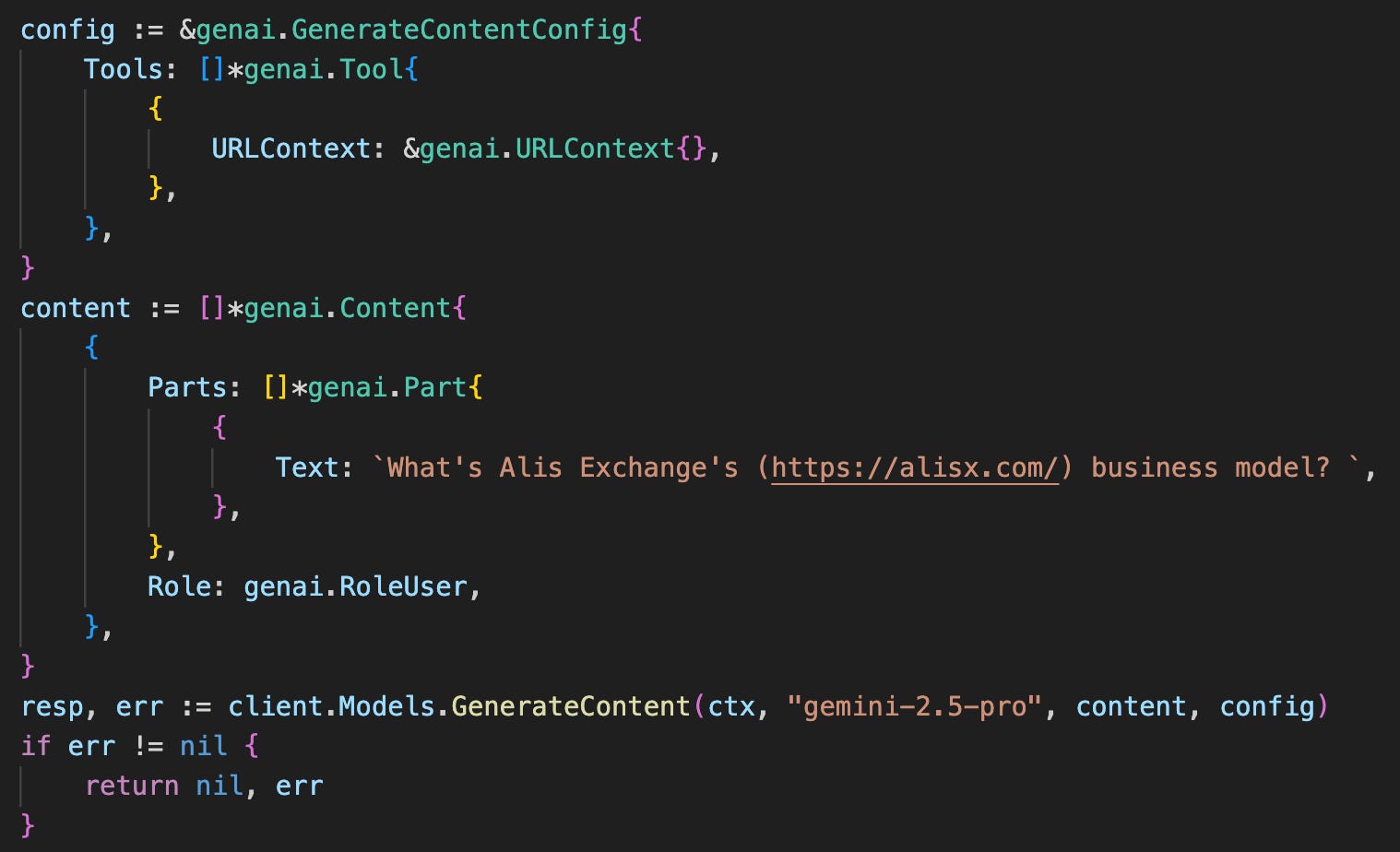
Here’s how you would enable the context tool using the Gemini Golang GenAI SDK. You simply need to enable the tool in the configuration for your model.
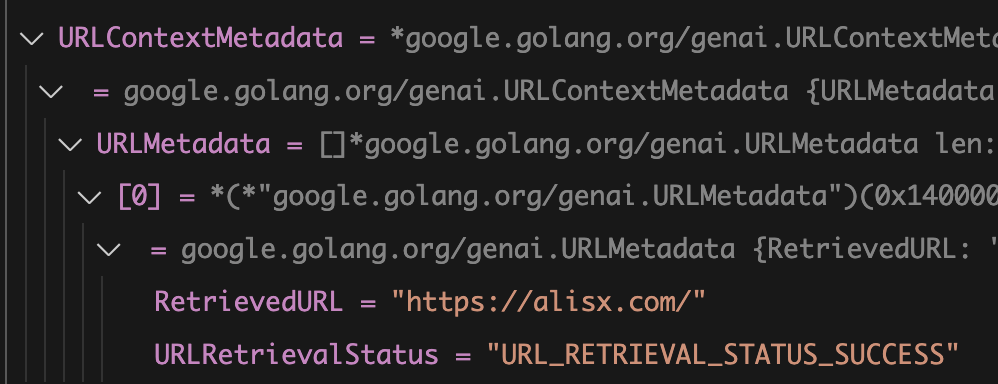
For debugging purposes, the response candidate includes a `URLMetadata` field, which we can inspect to see whether the model correctly accessed the url:
Pro Tips & Limitations
Keep these points in mind when using the URL context tool:
Structured Output Incompatibility: Because the model uses structured output internally to call the tool, you cannot also define your own custom structured output (schema) in the same API call. You must choose one or the other.
Check Supported Content: The URL context tool does not support videos.
Token Costs: The content the model retrieves from the website (the text, PDF content, etc.) is added to your total input token count, which you are billed for.
No Nested URLs: The tool will only scrape the single URL you provide. It will not crawl links within that page. We might explore combining the built-in tool with a custom scraper/ crawler in a later article to search deeper into websites.
On the Radar: What’s Moving the Needle
A curated look at the articles, papers, resources and updates that are worth your time this week.
In this Google Cloud “AI Agent Build-Off,” four teams compete in a 5-hour challenge to transform a basic transactional chatbot into a trusted FinTech agent, providing a practical demonstration of building with Google’s Agent Development Kit (ADK), Gemini models, and the Agent-to-Agent (A2A) protocol.
Google DeepMind announced the public preview of the Gemini 2.5 Computer Use model, a specialized model available via the Gemini API designed to power agents that can interact with UIs by clicking, typing, and scrolling—a capability showing rapid momentum and high potential for building general-purpose agents.
Google AI Studio has some incredible new updates. The “Build” tab in AI studio is now a fully fledged “vibe prototyping” tool. For free. My favourite features is “Annotate Mode” which allows you to mark up any AI freehand as feedback for Gemini to implement in the code. Absolutely mindblowing.
Want to Get Involved in the Community?
This roundtable is driven by its members. To join the conversation, share your work, or ask a question, you have two great options:
Join our private Google Chat space for real-time discussions and to participate in the weekly Open Thread. [Link to Chat Space]
Send a message to our community Google Group at roundtable-community@agentic-ai.build.
We look forward to hearing from you.
The Agentic AI Roundtable Core Team