
The Agentic AI Digest (20 Nov) | Parallel Processing Patterns, Gemini 3 & Nano Banana Pro
This week: We look at parallel processing patterns for bulk PDF summarisation, deep dive into "partial success" error handling strategies in Go, and highlight the massive Gemini 3 and Nano Banana Pro

Hi everyone,
Welcome to your weekly briefing from the Agentic AI Roundtable. Our goal is to cut through the noise and deliver the most relevant signals, patterns, and community wins to help you build more effectively.
Let’s dive in.
📒 From the Workbench: Patterns to Pocket
This week, we’re building on our fundamental GenAI skills by tackling parallel processing. This is a crucial technique because many API calls, like those to the Gemini API, are “blocking”—meaning they can take a significant amount of time to complete. If you have multiple independent tasks, running them one after another is highly inefficient. It’s much smarter to run them in parallel.
To make this concrete: last week, we worked on summarising a single PDF. But what if you need a method to process multiple PDFs at once? We’ll use that exact scenario this week to show you how to handle such tasks efficiently.
Parallel Processing in Practice
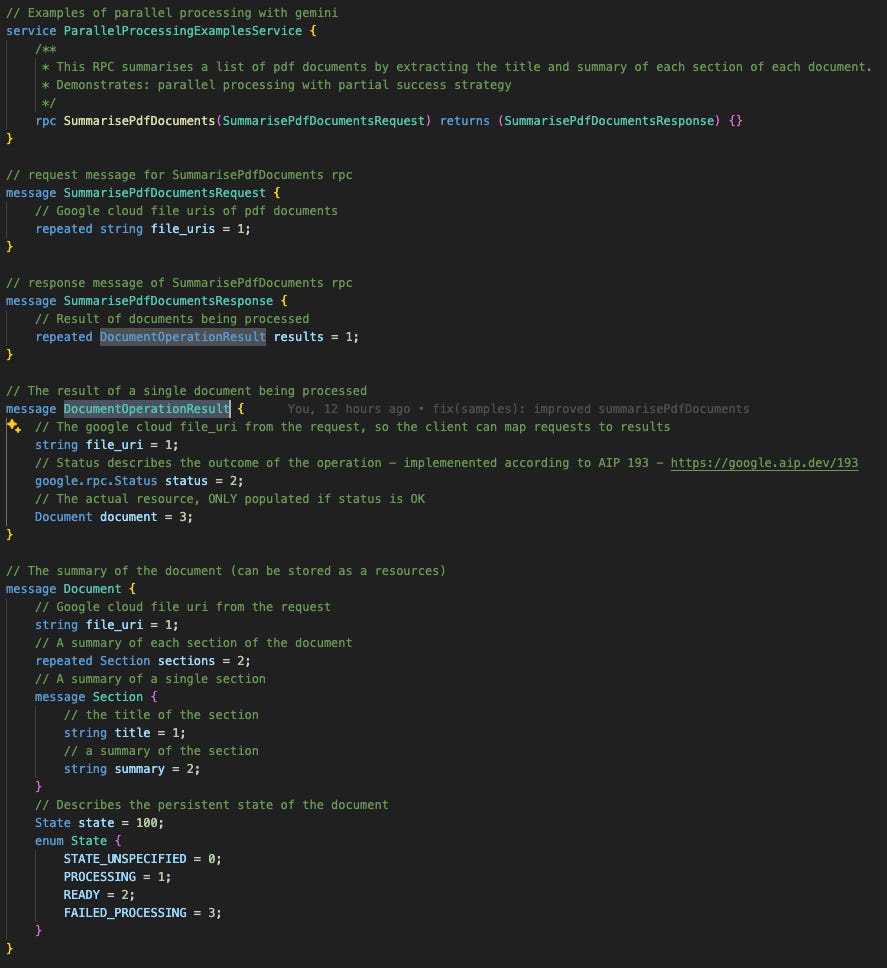
Let’s make this practical. We’ll start by defining the proto for our new RPC. It’s similar to last week's, but with one key difference: the SummarisedPdfDocumentsResponse now contains repeated Document. This small change in the proto is what allows us to process a whole batch of PDFs at once.
Strategy
We’re using Go, which is fantastic for this kind of work because of its built-in support for concurrency via goroutines.
When you’re running many tasks in parallel, a crucial question to ask is: “If one task fails, do the others still matter?” Your answer to this question determines your entire concurrency strategy.
Strategy 1: Fail-Fast (e.g., using errgroup): If the answer is “No,” you use a fail-fast approach. A good example is generating sections of a single structured document in parallel. If generating the “introduction” fails, the “conclusion” doesn’t matter. You’d want to cancel all other running tasks immediately and return the first error you see. This is the standard way of handling things, and should be your default.
Strategy 2: Partial Success (e.g., using sync.WaitGroup): If the answer is “Yes,” you could aim for partial success. In our scenario, we assume that we want to process as many PDFs as possible. If one PDF is corrupt and fails to parse, we still want to get the summaries from all the other valid PDFs. We can report the failure for that one document and let the client decide whether to retry it later. However, we must be wary of partial success, as it increases the complexity of the code, and we can easily violate AIP principles.
Error handling for partial success
It’s important to be careful with partial errors. They are generally discouraged, but they become necessary for bulk operations (like processing many PDFs at once). As Google’s API documentation notes, it would be “hostile to users to fail an entire large request because of a problem with a single entry.”
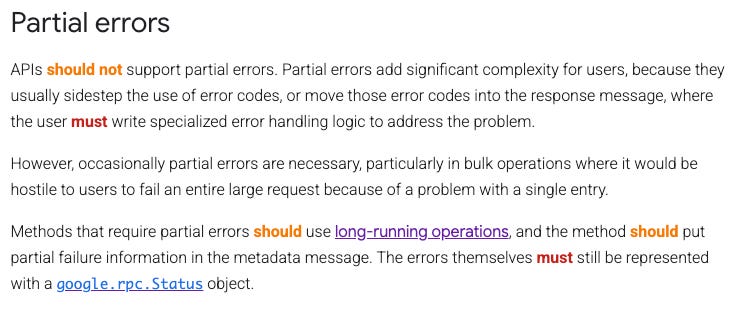
In this pattern, our RPC method only returns a top-level error in the case of a total system failure (like a dead database). If an individual document fails to process, the RPC method still returns OK.
The error is handled inside the response payload. We’ve applied this by wrapping our Document resource inside a DocumentOperationResult message. This wrapper is the key: it holds the google.rpc.Status for that single task, cleanly separating the ephemeral status of the operation from the persistent state of the Document itself.
Concurrent processing
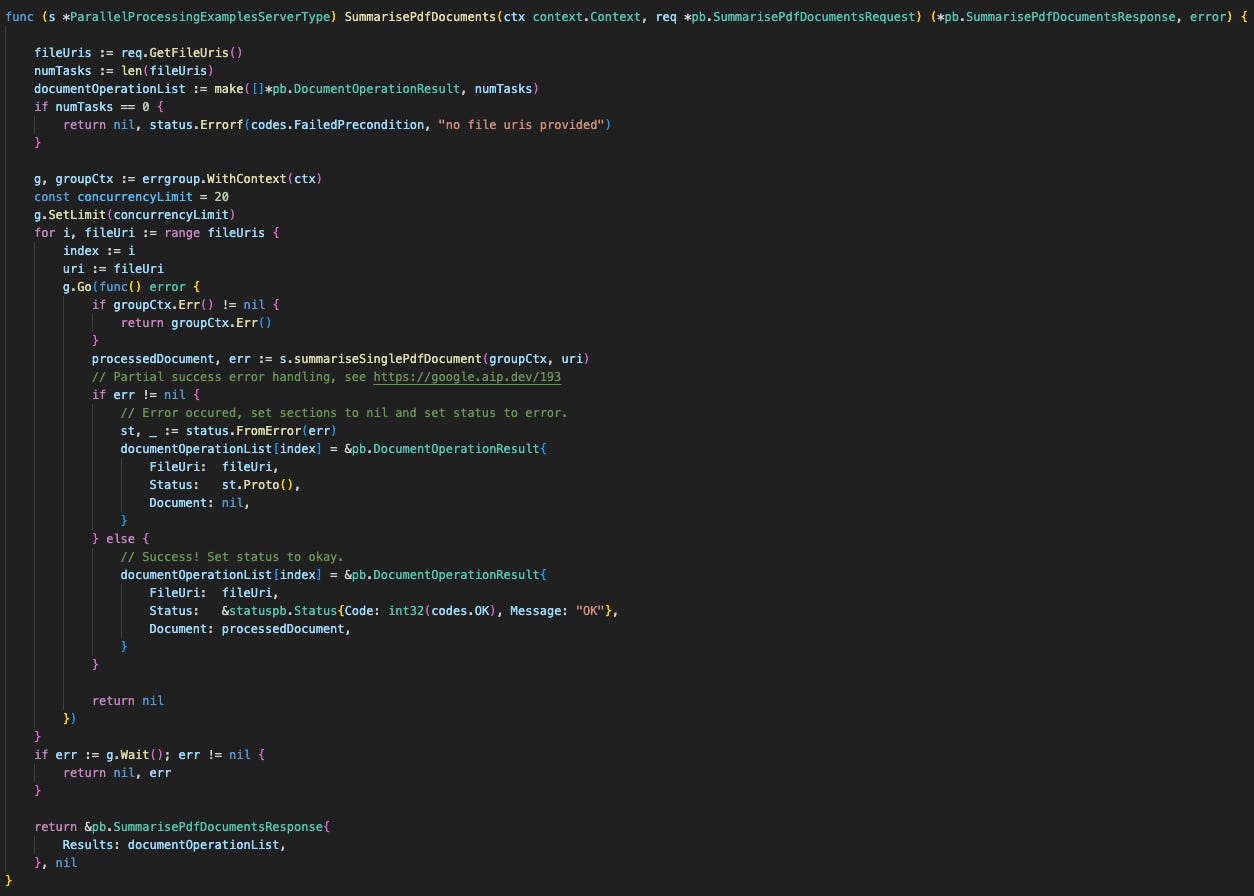
To build this “partial success” model in Go, we use golang.org/x/sync/errgroup in a specific “run-to-completion” mode. Here are the key components you’ll see in the code:
An errgroup: We use errgroup.WithContext to manage concurrency and handle potential parent context cancellation.
A “Run-to-Completion” Strategy: The crucial trick is to always return nil from our goroutines. This prevents the errgroup‘s default “fail-fast” behaviour. We capture any task error and store it inside the result object’s status field instead of returning it to the group.
A Pre-Allocated Results Slice: We make() our slice to the full size before starting the loop. This lets us write results to a specific slice[index] in order. This is thread-safe without a mutex and guarantees the results are in the same order as the request.
Gen AI API Errors & Retries
Finally, we need to address errors from the API itself. When you run many calls in parallel, you dramatically increase the chance of hitting rate limits. You’ll typically encounter two types of rate limit errors:
A standard “requests per minute” (RPM) limit.
A more general “Resource Exhausted” error, which means the service is temporarily too busy to handle your request.
In both cases, the strategy is identical: retry with exponential backoff.
This means you don’t just retry immediately. You wait a short time (e.g., 1 second), then retry. If it fails again, you wait longer (e.g., 2 seconds), then 4 seconds, and so on. This “backing off” gives the API service time to recover and is essential for building a robust system.
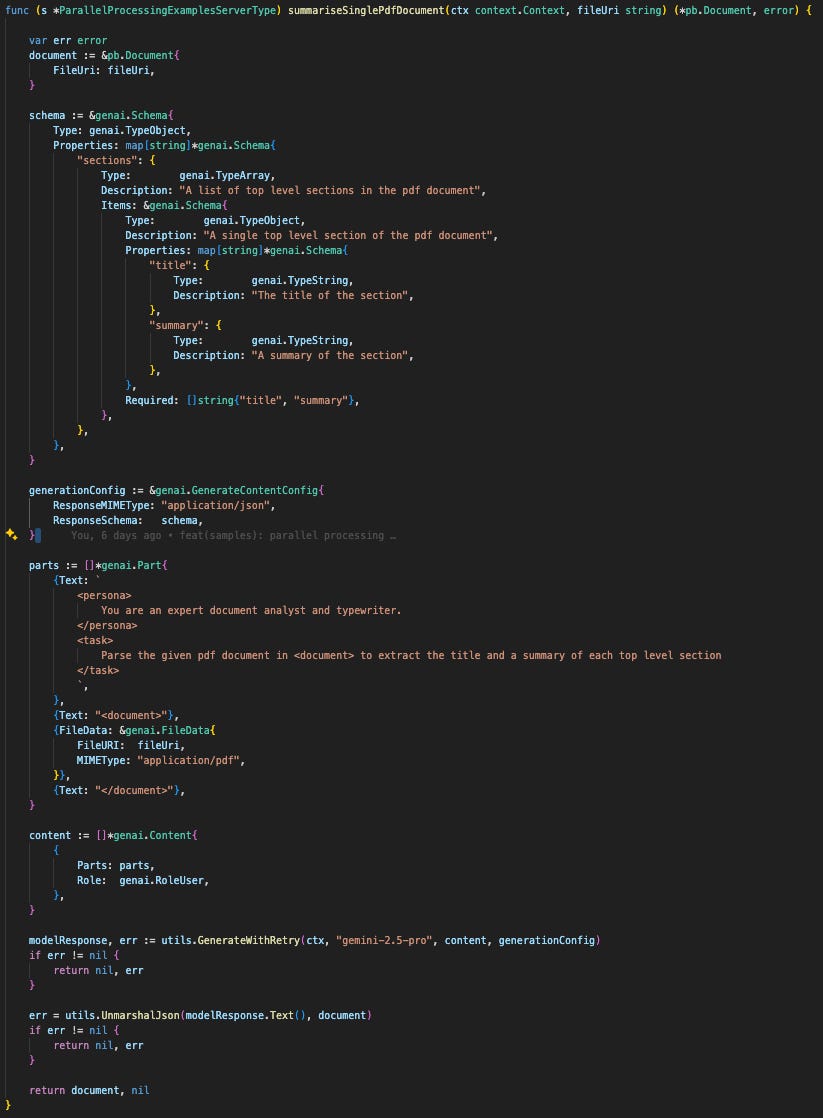
To handle this cleanly, we’ve encapsulated this entire logic inside a helper function called utils.GenerateWithRetry(), which wraps the standard GenerateContent() call. We’ll cover its specific implementation in detail in the following weeks.
Now you’re all set to make concurrent calls to Gemini. Happy coding!
Further resources:
📡 On the Radar: What’s Moving the Needle
A curated look at the articles, papers, resources and updates that are worth your time this week.
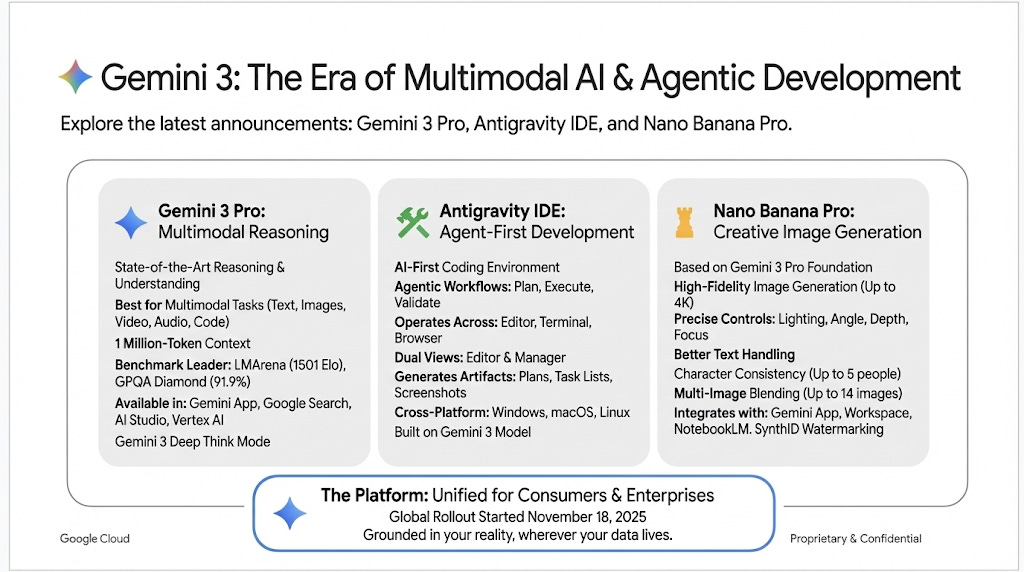
Amazingly, the above image was generated by Nano Banana Pro, the newly released image generation model. It’s almost eerie to see an imagen model writing text. Try it out with infographics!
This week was choc-full of announcements including Gemini 3, the new Anti Gravity IDE and Nano Banana Pro. Remember, remember this week in November.
Beyond Gemini 3, we recommend this short demo of what it looks like to deploy a custom Agent to Gemini Enterprise. It’s really exciting to start imagining the use cases that this unlocks.
🤝 Want to Get Involved in the Community?
This roundtable is driven by its members. To join the conversation, share your work, or ask a question, you have two great options:
Join our private Google Chat space for real-time discussions and to participate in the weekly Open Thread. [Link to Chat Space]
Send a message to our community Google Group at roundtable-community@agentic-ai.build.
We look forward to hearing from you.
The Agentic AI Roundtable Core Team